
The Popular Axxo Secrets on how to RIP DVD
Ripping a DVD to xvid or divx avi is really quite easy, if you have the right tools. You’ll first need to download DVD decrypter and auto gordian knot (autogk). DVD decrypter allows you to rip the raw DVD video and audio data off of your disk drive, decrypt the CSS protection, and finally remove any other protection schemes, such as Macrovision. AutoGK is a package of codecs and a GUI interface that will take the raw DVD data through an AV processing pipeline to produce a single windows video file.
Step 1: RIP
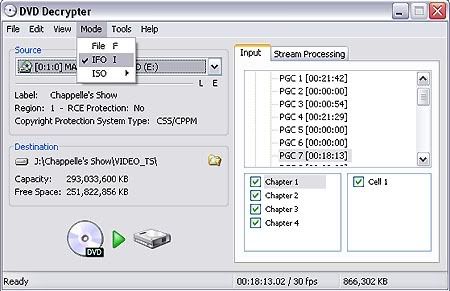
Put in a DVD and launch DVD Decrypter. Choose IFO (Information File) mode:
( Figure 1 )
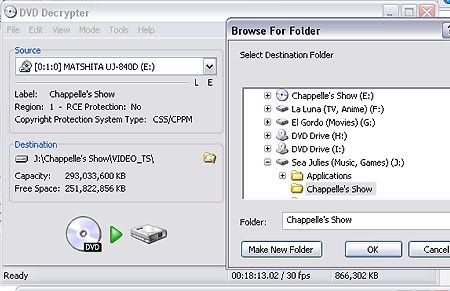
Now make sure you’ve selected a destination for your files:
( Figure 2 )
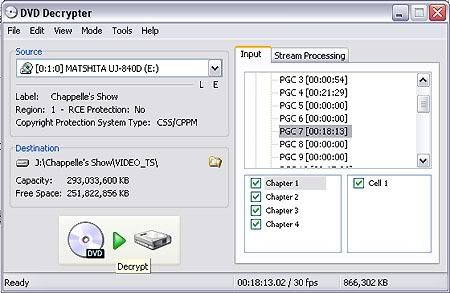
Now you need to find which program chain to rip (PGC). Pick the one that’s the longest, or in the case of a TV dvd, the episode you want to rip:
( Figure 3 )
Everything’s set up. Just click the green arrow and wait about twenty minutes, after which you will have a set of files which look like this:
VTS_01_0.IFO
VTS_01_PGC_07 – Stream Information.txt
VTS_01_PGC_07_1.VOB
The whole ripping process shouldn’t take more than 5 minutes.
Step 2: ENCODE
Launch AutoGK and select the first .vob that you just ripped as an input file, and set an output file name:
( Figure 4 )
Now you need to select audio (choose the first one) and subtitles, if any:
( Figure 5 )
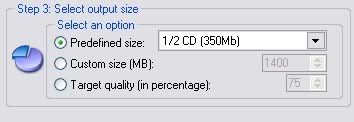
If you’re ripping a TV, set the preferred size to 350MB, if you’re ripping a movie, choose either 700MB or 1400MB, depending on your preference:
( Figure 7 )
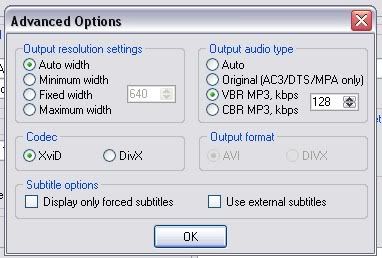
Finally, click on advanced settings and choose MP3 VBR 128kbs:
( Figure 8 )
Then click “add job” and “start.” After all this, you’ll have a log that looks like the following:
[04/18/2008 9:07:27 AM] AutoGK 2.26
[04/18/2008 9:07:27 AM] OS: WinXP (5.1.2600).2
[04/18/2008 9:07:27 AM] Job started.
[04/18/2008 9:07:27 AM] Input file: J:\VIDEO_TS\VTS_01_0.IFO
[04/18/2008 9:07:27 AM] Output file: J:\Output.avi
[04/18/2008 9:07:27 AM] Output codec: XviD
[04/18/2008 9:07:27 AM] Audio 1: Unknown language AC3 2ch
[04/18/2008 9:07:27 AM] Subtitles: none
[04/18/2008 9:07:27 AM] Format: .AVI
[04/18/2008 9:07:27 AM] Target size: 350Mb
[04/18/2008 9:07:27 AM] Custom audio settings: VBR MP3 with average bitrate: 128Kbps
[04/18/2008 9:07:27 AM] Started encoding.
[04/18/2008 9:07:27 AM] Demuxing and indexing.
[04/18/2008 9:08:30 AM] Processing file: J:\VIDEO_TS\VTS_01_PGC_04_1.VOB
[04/18/2008 9:08:30 AM] Source resolution: 720×480
[04/18/2008 9:08:30 AM] Found NTSC source.
[04/18/2008 9:08:30 AM] Source aspect ratio: 4:3
[04/18/2008 9:08:30 AM] Analyzing source.
[04/18/2008 10:28:40 AM] Source is considered to be hybrid (mostly NTSC).
[04/18/2008 10:28:40 AM] Looking for optimal hybrid thresholds.
[04/18/2008 10:28:45 AM] Found threshold of: 1.38
[04/18/2008 10:28:45 AM] Output will contain 38690 frames
[04/18/2008 10:28:45 AM] Decoding audio.
[04/18/2008 10:29:16 AM] Normalizing audio.
[04/18/2008 10:29:28 AM] Encoding audio.
[04/18/2008 10:31:57 AM] Audio1 size: 17,708,400 bytes (16.89 Mb)
[04/18/2008 10:31:57 AM] Overhead: 1,547,648 bytes (1.48 Mb)
[04/18/2008 10:31:57 AM] Video size: 347,745,552 bytes (331.64 Mb)
[04/18/2008 10:31:57 AM] Running compressibility test.
[04/18/2008 10:35:01 AM] Duration was: 3 minutes 4 seconds
[04/18/2008 10:35:01 AM] Speed was: 12.61 fps.
[04/18/2008 10:35:01 AM] Compressibility percentage is: 55.96
[04/18/2008 10:35:01 AM] Chosen resolution is: 560×416 ( AR: 1.35 )
[04/18/2008 10:35:01 AM] Predicted comptest value is: 73.79%
[04/18/2008 10:35:01 AM] Running first pass.
[04/18/2008 11:02:56 AM] Duration was: 27 minutes 55 seconds
[04/18/2008 11:02:56 AM] Speed was: 23.10 fps.
[04/18/2008 11:02:56 AM] Expected quality of first pass size: 76.04%
[04/18/2008 11:02:56 AM] Running second pass.
[04/18/2008 11:42:42 AM] Duration was: 39 minutes 46 seconds
[04/18/2008 11:42:43 AM] Speed was: 16.22 fps.
[04/18/2008 11:42:43 AM] Job finished. Total time: 2 hours 35 minutes 15 seconds
====================================================
Step 3: WATCH
You’re done. Delete all the non .avi files and enjoy the fruits of your ripping.




Apr 21, 2008 at 7:37 AM /
Thanks Dude, now i can host my own torrent Axxo like Quality,
* from Egypt…..hoping more great post from your site *